A few weeks ago I talked to you about some of Google's new partners. One of my favorites was OpenEd.com, you can read more about that here. I've been checking back to the Google Partner website that lists all of their new classroom partners and each week there are more and more awesome website that have partnered with google.
Today I've been looking at one of the newest partners, Actively Learn. When I first started to explore this website, I will tell you the truth, I wasn't that impressed. It seemed to be another website with a small database of free reading sources, and an even bigger resource off paid resources, but the more I began to dig around the more I began to like Actively Learn.
When you first get logged on, and you can one click log on with Google, you are first taken to the workspace. This is where you can add assignments, upload your own content and collaborate with other teachers. Basically, this seems to be where you will prepare all of your lessons before you push them out to students.
Actively Learn has provided a sample document for you to play around with. On this document there is a short tutorial video to show you how to use the website tools. You are able to highlight any part of the text that you wish, add comments, questions and even videos. This could be a great way for you to differentiate texts for students in your classroom. By previewing a text before assigning it to students you will be able to identify the most difficult parts of the text and provide additional information in the form of videos and pictures.
You will also be able to add questions throughout the text to assess students understanding. I love that you are able to choose between short answer, multiple choice and a poll. Another great feature of this website is that you can assign the common core standards to your questions, so your students, parents and even principal will know exactly what is being assessed.
And finally, the BEST part (at least to me) is that you are able to upload internet articles, Google Docs, PDFs and even create quizzes. My school bought us subscriptions to Scholastic Story Works (you can read more about how I use that resource here) and I struggled how to use this resource with Google Classroom because my students were unable to annotate the text as they read in the way that I wanted them to. Now, Actively Learn has solved my problem!
Since Storyworks allows you to save the articles and stories as PDFs to your computer, you can now upload them to Actively Learn and students can add notes, which in turn allows them to annotate while they are reading. You can even organize your thoughts with categories such as thoughts, main idea, text structure and so on.
One last AMAZING perk about this resource is that students are able to highlight text and have it read to them (WOW!) and even translated into another language.
Even though there are some wonderful pros for Actively Learn, there are also some cons. I did not see anywhere to import your Google Classroom roster, it looks like students have to sign up for Actively Learn using a code similar to Google Classroom. Also, there are some free resources already uploaded to the website, but a lot of the great rescues look to be paid.
Overall, Actively Learn seems to be a great addition to my Google Classroom toolkit. I'm sure there are many more uses for this website that I haven't uncovered yet. Have you found any great websites to use with Google Classroom? I would LOVE to hear about them.
Blog posts two days in a row?! Crazy, I know but I just wanted to pass along a few tips and tricks for those of you who have access to Scholastics Magazines or those of you who are looking to purchase this resource. My school recently bought a subscription to Storyworks and I have been pretty impressed with what I've found so far.
I've never really used Scholastic Magazines before, but let me tell you I have been impressed with what I have found! My teaching partner and I were looking for some passages that would be rigorous for our students as well as interesting.
My first trick is that on the Storywork homepage you can get resources for issues all the way back to 2007 - 2008. Its crazy to think I was a senior in high school at that time! Although you can find the resources for these magazines, you can't print the articles themselves. So, if you have been a long time subscriber or a on and off again subscriber this is a great resource for you. My suggestion would be to print off the resources that are provided for the magazines that you have so you will have them for future use.
Trick number two is that each magazine has a teacher guide that will allow you to download all kids of resources for this issue. I know teacher guides aren't the end all be all, but this would be a great resource for creating sub plans or just getting ideas on how to use the Storyworks magazine. In the teacher guide you can find tips for setting up the lesson, lesson objectives as well as purposes for reading, close reading questions and even differentiation. For first year teachers or even experiences teachers this teacher guide could come in handy!
Just today I was looking for a passage to practice inferring with my students and I just started browsing Storyworks. I love how each magazine offers different genres, and even grammar and writing practice. I knew I was wanting my feature skill to be inferring so it was super easy to find a passage to meet my needs. Even though the feature skill I will be working on is inferring, I know I can use this passage on so many more things. Each passage also has a content connection and are engaging to students.
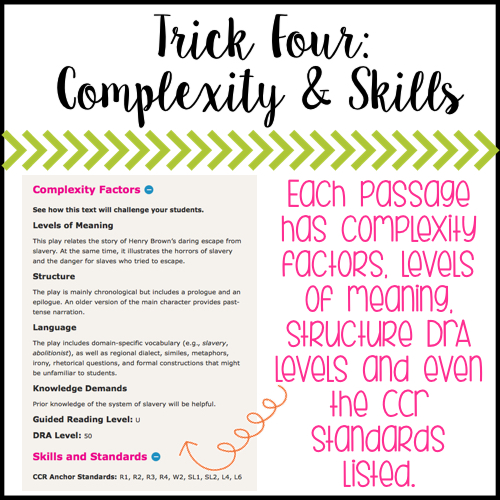
The main reason my team teacher and I wanted to look into purchasing Storyworks was for rigorous passages for our 5th graders. It is so helpful that each passage comes with a complexity factor section that gives information on levels of meaning, structure, language and even DRA levels. It is also helpful to be able to connect the passage to specific standards.
Last but not least, my FAVORITE trick that I found while exploring Storyworks online resource. Some articles have INTERACTIVE close reading questions and comprehension questions. For the close reading questions there are worksheets with text boxes for students to type their answers. I could see myself using this in Google Classroom for an exit slip or even partner practice. Want to sell this idea to your Principal, just say the words "Paperless Classroom"!
For the comprehension questions students can complete multiple choice questions. This could be used as a whole class review on the SmartBoard or even as a quick assessment. Did I mention that this was self-grading?!
I know that I didn't even begin to scratch the surface on what Scholastic Storyworks Magazine provides for teachers but hopefully if you are looking into the resource some of my tips and tricks will help you decide on if thesis right for your classroom or not. I'm interested in seeing how you use Storyworks in your classroom!